
ParanoidBrowser1.0.0 - Google Play
You'll be able to see results in few seconds.
Publisher Description
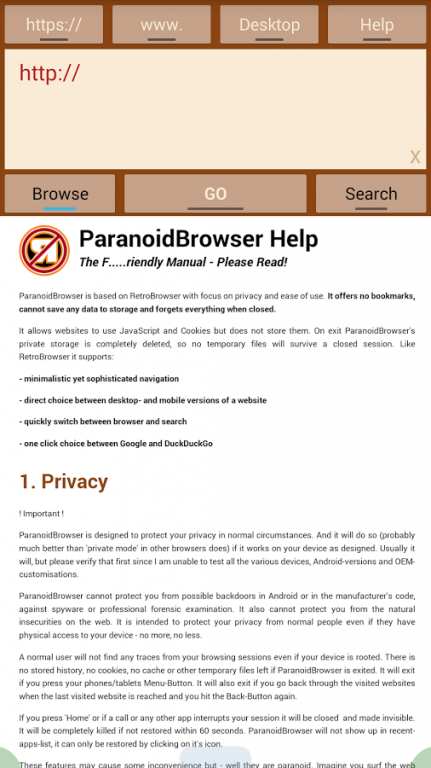
ParanoidBrowser is based on RetroBrowser with focus on privacy and ease of use. It offers no bookmarks, cannot save any data to storage and forgets everything when closed.
It allows websites to use JavaScript and Cookies but does not store them. On exit ParanoidBrowser's private storage is completely deleted, so no temporary files will survive a closed session. Like RetroBrowser it supports:
- minimalistic yet sophisticated navigation
- direct choice between desktop- and mobile versions of a website
- quickly switch between browser and search
- one click choice between Google and DuckDuckGo
- comprehensive documentation/help
Privacy
ParanoidBrowser is designed to protect your privacy in normal circumstances. And it will do so (probably much better than 'private mode' in other browsers does) if it works on your device as designed. Usually it will, but please verify that first since I am unable to test all the various devices, Android-versions and OEM-customisations.
ParanoidBrowser cannot protect you from possible backdoors in Android or in the manufacturer's code, against spyware or professional forensic examination. It also cannot protect you from the natural insecurities on the web. It is intended to protect your privacy from normal people even if they have physical access to your device - no more, no less.
A normal user will not find any traces from your browsing sessions even if your device is rooted. There is no stored history, no cookies, no cache or other temporary files left if ParanoidBrowser is exited. It will exit if you press your phones/tablets Menu-Button. It will also exit if you go back through the visited websites when the last visited website is reached and you hit the Back-Button again.
If you press 'Home' or if a call or any other app interrupts your session it will be closed and made invisible. It will be completely killed if not restored within 60 seconds. ParanoidBrowser will not show up in recent-apps-list, it can only be restored by clicking on it's icon.
These features may cause some inconvenience but - well they are paranoid. Imagine you surf the web privately, are getting an important call, immediately go to some collegues and leave your Android on your desk. You will be really happy if ParanoidBrowser has killed itself when you return to show e.g. an Email to somebody.
Security
To make it short ParanoidBrowser is as secure (?) or insecure (!) as your tablet or smartphone, your version of Android and the manufacturers' and mobile providers' customizations. Think for yourself what that means for you ...
It works as a normal Android App without lots of permissions. Of course it needs Internet access, that's all. Websites are displayed in Android's built-in Webview which is used by the standard browser and most others as well.
ParanoidBrowser is freeware.
© 2015 Nikolaus von Bomhard
google@bomhard.de . www.bomhard.de
About ParanoidBrowser
The company that develops ParanoidBrowser is Nikolaus von Bomhard. The latest version released by its developer is 1.0.0.
To install ParanoidBrowser on your Android device, just click the green Continue To App button above to start the installation process. The app is listed on our website since 2015-01-22 and was downloaded 0 times. We have already checked if the download link is safe, however for your own protection we recommend that you scan the downloaded app with your antivirus. Your antivirus may detect the ParanoidBrowser as malware if the download link to de.bomhard.android.ParanoidBrowser is broken.
How to install ParanoidBrowser on your Android device:
- Click on the Continue To App button on our website. This will redirect you to Google Play.
- Once the ParanoidBrowser is shown in the Google Play listing of your Android device, you can start its download and installation. Tap on the Install button located below the search bar and to the right of the app icon.
- A pop-up window with the permissions required by ParanoidBrowser will be shown. Click on Accept to continue the process.
- ParanoidBrowser will be downloaded onto your device, displaying a progress. Once the download completes, the installation will start and you'll get a notification after the installation is finished.
Program Details
System requirements
Download information
Pricing
Version History
version 1.0.0
posted on 2015-01-22
Disclaimer
Official Google Play Link
We do not host ParanoidBrowser on our servers. We did not scan it for viruses, adware, spyware or other type of malware. This app is hosted by Google and passed their terms and conditions to be listed there. We recommend caution when installing it.
The Google Play link for ParanoidBrowser is provided to you by apps112.com without any warranties, representations or guarantees of any kind, so access it at your own risk.
If you have questions regarding this particular app contact the publisher directly. For questions about the functionalities of apps112.com contact us.
